

Last chapter we talked about the harmonic series — every sound is a fundamental frequency with overtones riding on top of it. Now let’s do something with that knowledge: start removing parts of it and hear what happens.
This is the bridge from physics into synthesis. The moment you put your hand on a filter, you’re doing subtractive work — taking a sound that’s rich with harmonics and carving away the parts you don’t want. That’s the core idea behind subtractive synthesis, and it’s also what you’re doing every time you reach for an EQ. Same principle, different context.
What Is a Filter?
A filter is anything that removes frequencies from a signal. That’s it. When you turn the treble knob down on a car stereo, you’re filtering. When you cup your hand over a speaker, you’re filtering. When you roll off the high end on a synth, you’re filtering.
In audio production, filters are precise. You choose which frequencies to remove, how much to remove, and how sharply the cutoff happens. The result is a reshaped version of the original sound — same fundamental character, different harmonic balance.
Filter Types
Five filter type response curves side by side: low-pass, high-pass, band-pass, notch, and shelf filters with frequency on X-axis and gain on Y-axis.
There are a handful of filter shapes you’ll see everywhere — in EQ plugins, in synthesizers, in hardware. They all do the same basic thing (remove frequencies), just from different directions:
-
Low-pass filter (LPF): Lets low frequencies through, cuts the highs. This is the most common filter in synthesis and the one you’ll use the most. Sweeping a low-pass filter down over a bright waveform is the sound of subtractive synthesis.
-
High-pass filter (HPF): Lets high frequencies through, cuts the lows. Essential in mixing — you’ll use this to clean up rumble, mud, and low-end buildup on tracks that don’t need bass content.
-
Band-pass filter (BPF): Lets a narrow band of frequencies through, cuts everything above and below. Think of a telephone or a walkie-talkie — that thin, nasal sound is a band-pass filter at work.
-
Notch filter: The opposite of a band-pass — cuts a narrow band and lets everything else through. Useful for surgical removal of problem frequencies.
-
Shelf filters: Boost or cut everything above (high shelf) or below (low shelf) a target frequency. These are the “treble” and “bass” knobs on most consumer audio equipment.
EQ: A Collection of Filters
Parametric EQ interface diagram with labeled bands, showing frequency, gain, and Q (bandwidth) parameters on each band.
Most people miss this: an EQ is just a collection of filters working together. A typical parametric EQ gives you several “bands,” each of which is a filter with adjustable parameters:
- Frequency: Where the filter operates — which frequencies it targets
- Gain: How much it boosts or cuts at that frequency
- Q (bandwidth): How wide or narrow the filter’s effect is. A narrow Q affects a tight range of frequencies. A wide Q affects a broad range.
Most EQ plugins give you a combination of shelves on the ends and parametric bands in the middle. The outer bands handle broad tonal shaping (more bass, less treble). The parametric bands handle precision work — finding and fixing specific problems.
The Targeting Workflow
When you’re dialing in an EQ, think of the process as happening in two stages: a targeting step and an adjustment step.
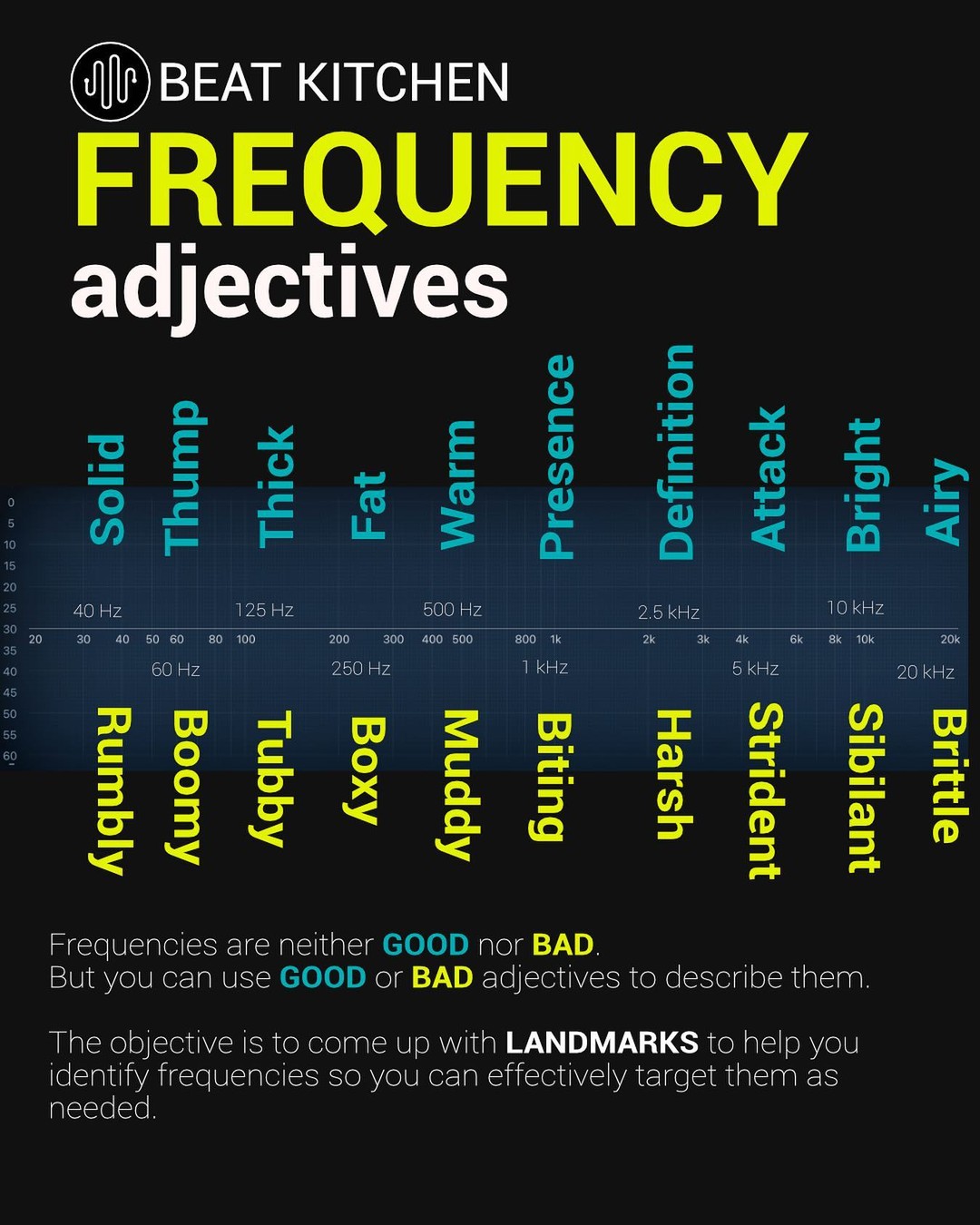
The targeting step is a search and rescue operation. Start with a parametric band, narrow the bandwidth so you can hear individual frequencies clearly, and sweep across the spectrum. The thing you’re looking for — the resonance, the mud, the harshness, the sweet spot — will come into focus as you pass over it.
Once you’ve found your target, move into the adjustment stage. And here’s the key question: can you get away with a cut rather than a boost?
Most equalizers introduce phase shift in order to do their jobs. The design of most filters causes them to introduce more phase shift when they boost than when they cut. Beyond the phase issue, you should always be thinking about levels and headroom. A boost adds energy to the signal. A cut removes it. And headroom — the distance between your current level and the maximum — is a finite resource.
So rather than creating a bump where you want more presence, look for masking frequencies building up elsewhere. Maybe there’s low-mid mud that’s obscuring your target. A shelf or a cut down there might expose and accentuate the frequency you want — without adding any energy at all.
This isn’t a rule that says “never boost.” It’s a practice that says: after you find your target, ask yourself if a cut somewhere else accomplishes the same goal. Often it does, and it does it cleaner.
Resonance and Slope
Filter resonance and slope comparison: low-pass filter at 12dB/oct vs 24dB/oct slope, with and without resonance, showing how resonance creates a peak at the cutoff frequency.
Two more parameters that show up on both EQ filters and synth filters:
Emphasis at the filter's cutoff frequency. Low resonance is subtle; high resonance makes the cutoff ring out, creating squelchy, vowel-like sounds. Also called Q boost on synth filters.
Resonance emphasizes the frequencies right at the cutoff point, creating a peak. On a low-pass filter, resonance makes the cutoff frequency ring out before the sound drops away. At low settings it’s subtle — a little brightness at the edge. Crank it up and the filter starts to whistle and sing. This is how you get those squelchy, vowel-like sounds in synthesis.
How aggressively a filter cuts, measured in decibels per octave. A 12 dB/octave slope is gentle; a 24 dB/octave slope is steep and dramatic.
Slope controls how aggressively the filter cuts. A 12 dB/octave slope is gentle, a 24 dB/octave slope is steep and dramatic. A steeper slope means a sharper divide between what gets through and what doesn’t.
Decibels: A Quick Note
You’ll see decibels (dB) everywhere in this course. The key thing to know right now: decibels are logarithmic, which means they match how your ear actually perceives loudness. A 3 dB increase is just barely noticeable. A 6 dB increase sounds noticeably louder. A 10 dB increase sounds roughly twice as loud. This scale is why we use decibels instead of percentages — it maps to human perception, not to physics.
“Start Rich, Subtract to Taste”
The idea that connects everything in this chapter to everything that follows: start with a sound that has a lot of harmonic content, then filter away what you don’t need.
That’s subtractive synthesis in a sentence. It’s also the philosophy behind most EQ work in mixing. You don’t start with an empty canvas and try to build up — you start with a full signal and sculpt it down. The raw material is rich. Your job is to shape it.
This principle will carry through the next several chapters as we build a synthesizer from its component parts. The filter you just learned about? It’s the same filter that sits at the heart of every subtractive synth. The EQ you’ll use in mixing? Same concept, same math, different context. Learn it once and you’ll see it everywhere.
What to Practice
- If you have access to an EQ plugin, load it on any track and try the targeting workflow: narrow the Q, sweep across the spectrum, find something interesting. Then widen the Q and make a subtle adjustment. Notice how different a narrow cut feels compared to a broad one.
- Listen to a synth pad or a bass sound and imagine which frequencies you’d remove to change its character. Darker? Cut the highs. Thinner? Cut the lows. Nasal? There’s a buildup somewhere in the midrange. That instinct — hearing what you’d subtract — is the core skill.
- If you’ve played with a synthesizer before, find the filter cutoff knob and sweep it while a note is playing. That’s the sound of this entire chapter in one gesture.
Search This Guide
This Course
- 1. Sound, Vibration, and the Harmonic Series
- 2. Filtering Sound — From Harmonics to EQ
- 3. Oscillators and Waveforms
- 4. Shaping Sound — Envelopes, Filters, and Amplifiers
- 5. Modulation and Movement — LFO, Unison, and Glide
- 6. Sound Design and Comparing Synths
- 7. Signal Chain and Gain Staging
- 8. Human Hearing and Loudness Perception
- 9. Introduction to Mastering — Perfect, Pretty, Loud
- 10. Reference Tracks — The Most Important Tool in Mixing
- 11. Signal Flow and Mixer Routing
- 12. Session Setup and Organization
- 13. The Art and Science of Mixing
- 14. Mixing in Practice — The Reference Method
- 15. Introduction to Dynamics — Gates and Expansion
- 16. Compression I — The Basics
- 17. Compression II — Shaping
- 18. Mastering Revisited — Dynamics in Context
- 19. Compression III — Types, Parallel, and Advanced
- 20. Multiband, De-Esser, Dynamic EQ, and Sidechain
- 21. Delay — Time, Rhythm, and the Haas Effect
- 22. Introduction to Stereo
- 23. Mid-Side and Stereo Recording
- 24. Acoustics and Room Treatment
- 25. Reverb — Space, Types, and Practice
- 26. Modulation and Creative Effects
- 27. Sources and Further Reading
Related Videos
When you're ready to take the next step, it starts with a place where you can ask questions. We teach live — small group, cameras optional, taught by someone who gives a shit.
Find Out How You Can Join Us →© 2026 Beat Kitchen School — beatkitchen.io. Licensed under CC BY-NC-SA 4.0. Free to share and adapt for non-commercial purposes with attribution.


