Reading a Chord — Wedges and Function
The ring of wedges is what makes this a harmony wheel and not just a chord namer. Each wedge is a harmonic function in the current key — not a fixed chord, but a role. Play a chord and the wedge for its function lights up, so you’re reading what the chord is doing, not only what it’s called.
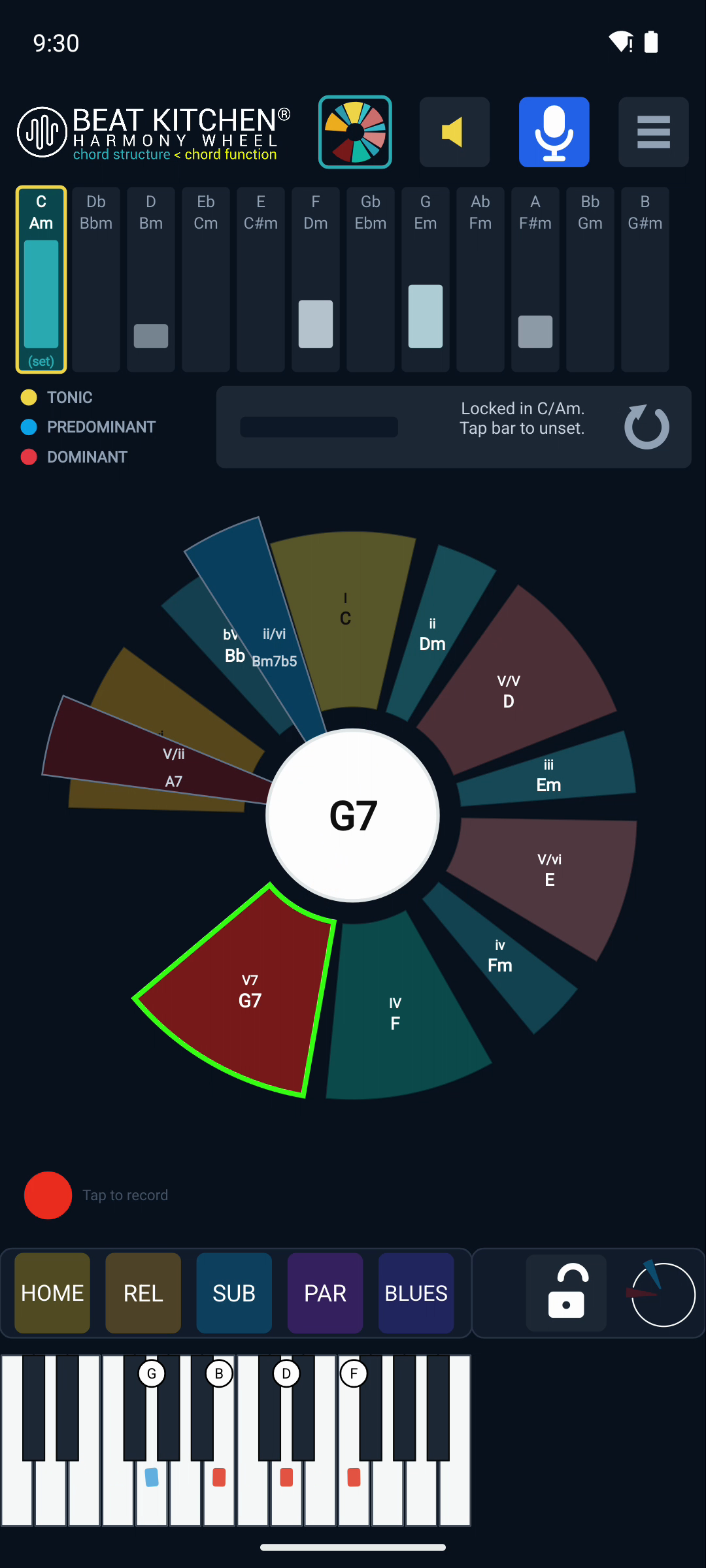
The functions on the wheel
In any key, the wheel lays out the chords you actually use:
- I, ii, iii, IV, V, V7, vi, vii° — the diatonic chords, the seven built from the scale.
- iv — the borrowed minor subdominant (the “minor four” that gives that bittersweet pull).
- ♭VII — the flat-seven, a common borrowed major chord.
- V/V and V/vi — secondary dominants: dominant chords that point at a chord other than the tonic. V/V is “the dominant of the dominant”; V/vi sets up the relative minor. (The Music Theory guide builds these up step by step.)
- Bonus wedges V/ii and ii/vi — two more secondary functions you can switch on (see the Mic & Bonus chapter).
You don’t have to memorize that list — the point of the wheel is that you see it. Play through a song and watch which wedges light: you’re reading its harmony in real time.
The three colors
The wedges are grouped by color into the three jobs a chord can do:
- Tonic — home. Rest, resolution, arrival (I, and its stand-ins vi and iii).
- Predominant — the build. Chords that set up tension and lead toward the dominant (ii, IV, iv).
- Dominant — the pull. Chords that strain to resolve home (V, V7, vii°).
This is the heartbeat of functional harmony: home → tension → pull → home. Once the colors are in your eye, you can glance at any progression and see its shape — where it’s resting, where it’s building, where it’s about to resolve.
Clicking a wedge
The wheel isn’t only for listening — click any wedge and it previews that chord: you’ll hear it (through the preview synth) and see its notes on the keyboard. That makes the wheel a way to explore a key, not just analyze one. Want to know what the ♭VII sounds like in your key? Click it. Curious how V/vi sets up the relative minor? Click V/vi, then vi, and hear the pull.
What to Practice
- Play a I–IV–V–I in any key and watch the wedges light in turn. Name the color of each as it goes.
- Click around the wheel — the borrowed chords (iv, ♭VII) and the secondary dominants (V/V, V/vi) — to hear functions you might not reach for by habit.
- Play a song you know and just watch the colors. Notice how often it’s home → predominant → dominant → home.
Search This Guide
This Course
- 1. What the Harmony Wheel Is
- 2. Reading a Chord — Wedges and Function
- 3. Harmonic Spaces
- 4. Finding the Key — Listen Mode and the Key Tracker
- 5. The Keyboard and Enharmonic Spelling
- 6. Mic, Speaker, Bonus Wedges, and the Legend
- 7. The Tetrachord Toolkit
- 8. The Random Chord Generator
- 9. The Built-in Guidebook
- 10. Options and Settings
When you're ready to take the next step, it starts with a place where you can ask questions. We teach live — small group, cameras optional, taught by someone who gives a shit.
Find Out How You Can Join Us →© 2026 Beat Kitchen School — beatkitchen.io. All rights reserved. Unauthorized reproduction or distribution of this material is prohibited.