Finding the Key — Listen Mode and the Key Tracker
Every function on the wheel is relative to a key — a G7 is the V7 in C, but the I7 in G. So before the wheel can tell you what a chord is doing, it has to decide what key you’re in. The key tracker is where you watch it think, and where you get the final say.
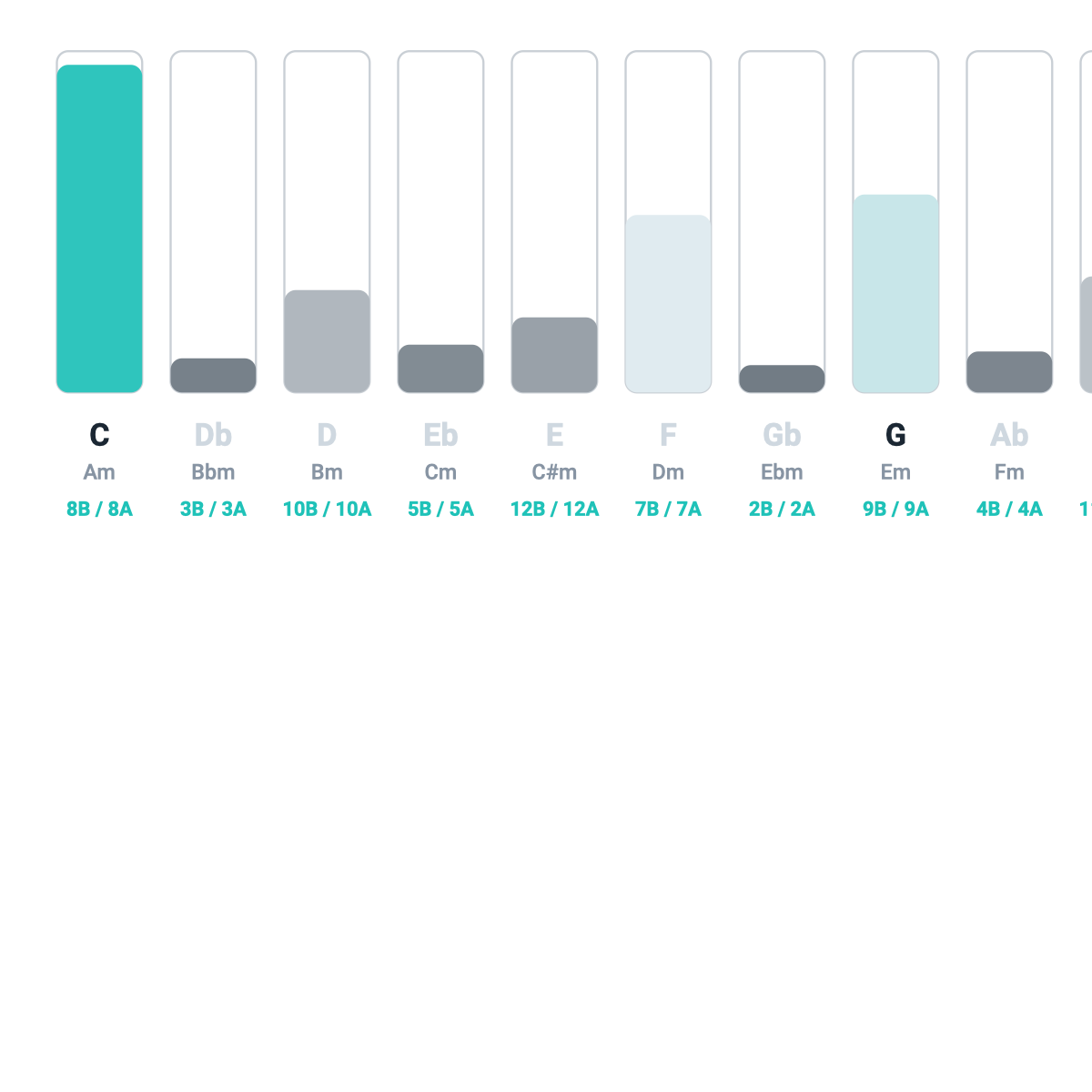
The 12-bar meter
The tracker is a row of twelve bars, one per possible key. As music comes in, each bar’s height shows how confident the wheel is that you’re in that key. Play in C for a while and the C bar rises above the rest. Modulate, and you’ll see a different bar start to climb. It’s a live readout of the app’s best guess, and a surprisingly good ear-training display in its own right — you can watch a key assert itself.
Listen, commit, reset
By default the wheel is in Listen mode: it keeps weighing every key and never fully commits, so it can follow music that wanders. That’s right for analyzing a track you don’t know.
But sometimes you want to pin it down — to study one key, or because the music is ambiguous and you know better than the detector. Click a bar to commit to that key. Now the wheel reads every chord relative to your chosen key and stops second-guessing. Reset returns it to Listen mode.
Committing matters for more than tidiness: the harmonic spaces only rotate once a key is locked. If the wheel seems stuck in HOME and won’t move into PAR or REL, commit a key first — that’s what gives “sideways” motion something to be relative to.
Keyboard shortcuts (desktop)
Three shortcuts speed this up:
K— capture the current best-guess key (commit to whatever’s winning).C— commit straight to C, the wheel’s default home and the key most examples use.R— return to Listen mode.
What to Practice
- Put on a song in a clear key, turn on the mic, and watch the right bar climb to the top.
- Commit that key (click its bar) and notice the functions settle. Then Reset and watch it go back to weighing.
- Press
Cto jump to C, then explore the wheel and spaces in the key most of the teaching examples use.
Search This Guide
This Course
- 1. What the Harmony Wheel Is
- 2. Reading a Chord — Wedges and Function
- 3. Harmonic Spaces
- 4. Finding the Key — Listen Mode and the Key Tracker
- 5. The Keyboard and Enharmonic Spelling
- 6. Mic, Speaker, Bonus Wedges, and the Legend
- 7. The Tetrachord Toolkit
- 8. The Random Chord Generator
- 9. The Built-in Guidebook
- 10. Options and Settings
When you're ready to take the next step, it starts with a place where you can ask questions. We teach live — small group, cameras optional, taught by someone who gives a shit.
Find Out How You Can Join Us →© 2026 Beat Kitchen School — beatkitchen.io. All rights reserved. Unauthorized reproduction or distribution of this material is prohibited.