The Random Chord Generator
Stuck for a progression? The Random Chord Generator rolls one up. It’s the app’s idea-spark tool — but because it shows every chord as a function, it teaches while it surprises you.
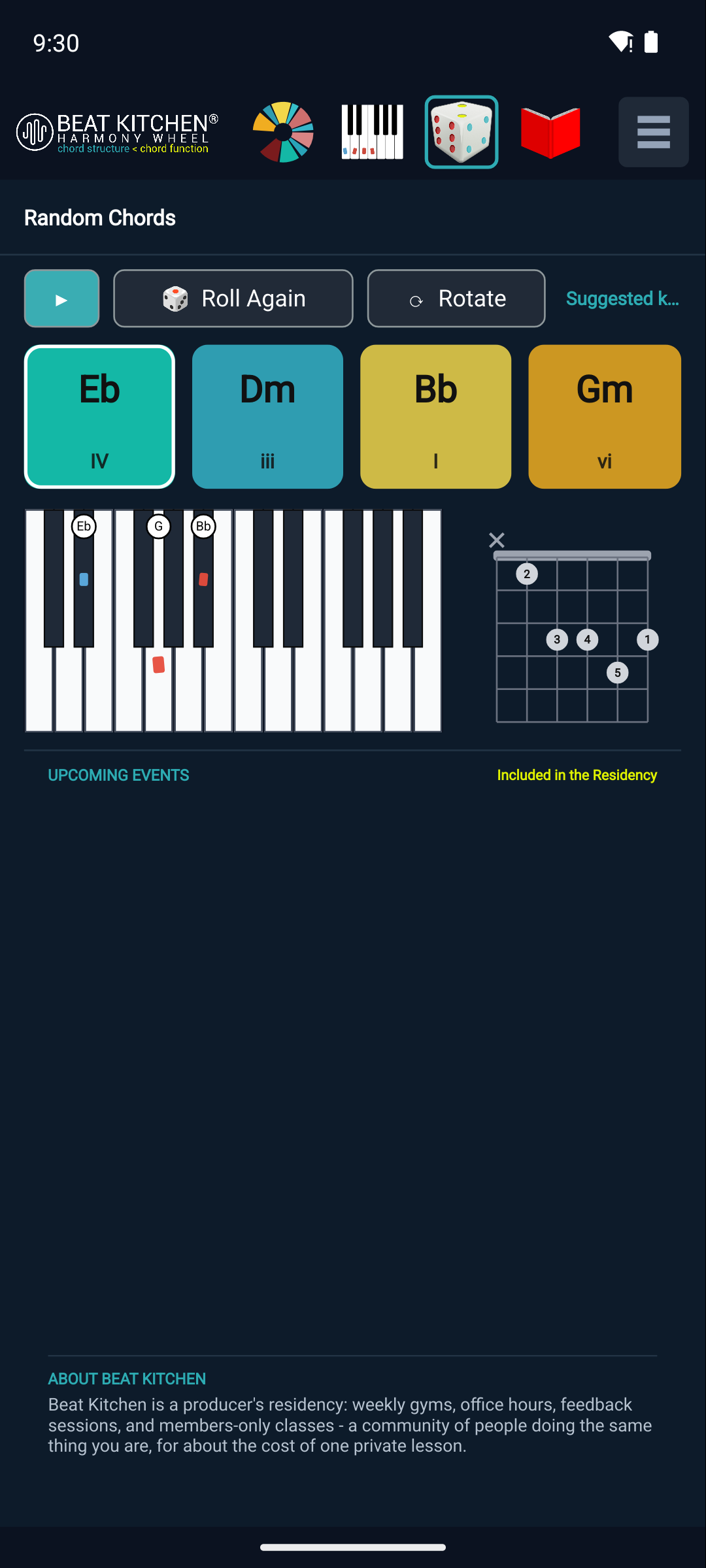
Three buttons
- Roll Again — generates a fresh set of random diatonic chords (chords that belong to a key, so the result always makes musical sense). Keep rolling until something catches your ear.
- ▶ Play / stop — cycles through the current chords on the synth so you hear the progression, not just read it.
- Rotate — rotates the voicing of the current chords (same chords, notes rearranged), so you can find a smoother or more interesting version of the same progression.
Function cards
Each chord appears as a function card — the chord name and its Roman-numeral role: Eb = IV, Bb = I, Gm = vi. So a random roll isn’t a mystery; you see why it works — “oh, that’s a I–vi–IV.” Alongside the cards, the on-screen keyboard and a guitar tab show you how to actually play each chord.
That pairing is the point: it’s a generator that doubles as a flashcard. Roll a progression you like, read off its functions, and you’ve learned a little more about what makes progressions work — the same vocabulary the wheel and the guidebook teach.
What to Practice
- Roll a few progressions and Play each. When one grabs you, read its function cards — what’s the pattern (I–V–vi–IV? ii–V–I)?
- Hit Rotate on a progression you like and listen to how the voicing changes the feel without changing the chords.
- Take a rolled progression to an instrument using the keyboard and guitar tab, and try writing over it.
Search This Guide
This Course
- 1. What the Harmony Wheel Is
- 2. Reading a Chord — Wedges and Function
- 3. Harmonic Spaces
- 4. Finding the Key — Listen Mode and the Key Tracker
- 5. The Keyboard and Enharmonic Spelling
- 6. Mic, Speaker, Bonus Wedges, and the Legend
- 7. The Tetrachord Toolkit
- 8. The Random Chord Generator
- 9. The Built-in Guidebook
- 10. Options and Settings
When you're ready to take the next step, it starts with a place where you can ask questions. We teach live — small group, cameras optional, taught by someone who gives a shit.
Find Out How You Can Join Us →© 2026 Beat Kitchen School — beatkitchen.io. All rights reserved. Unauthorized reproduction or distribution of this material is prohibited.