Harmonic Spaces
A single key only has so many chords. Real music borrows from next door — a minor four from the parallel minor, a turn toward the relative, a bluesy dominant. The harmonic spaces are how the wheel handles that: instead of cramming every possible chord into one ring, it rotates into a neighboring region when the music goes there, and rotates back when it comes home.
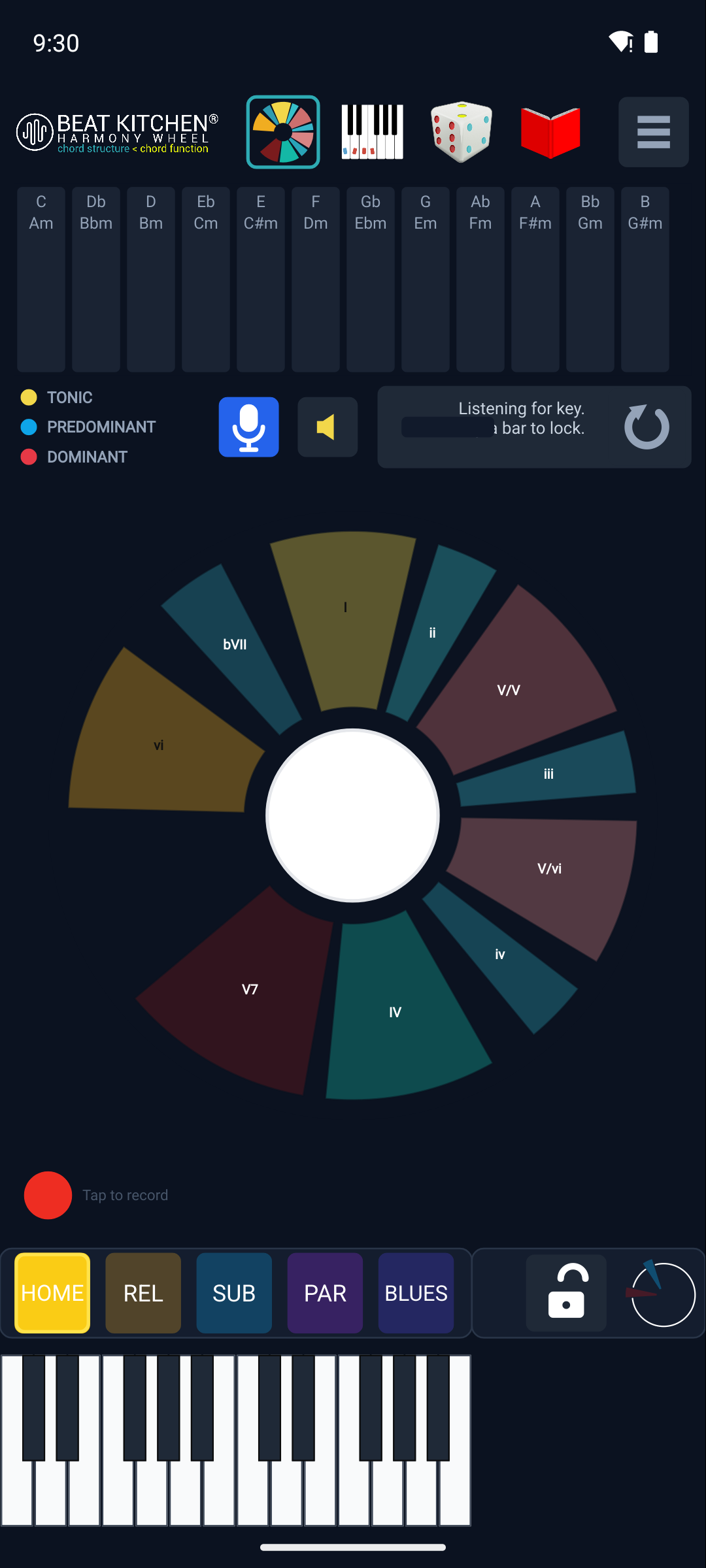
The five spaces
The row along the bottom names them:
- HOME — the tonic’s own diatonic chords. Where most music sits.
- SUB (Subdominant) — the world of the IV chord’s key, a step toward the “flat” side. Where music goes when it leans subdominant.
- PAR (Parallel) — the parallel major/minor: same root, opposite quality. This is where borrowed chords live (the iv, the ♭VII) — major borrowing from minor and vice versa.
- REL (Relative) — the relative minor or major: same notes, different home. Where a song tips into its relative key.
- BLUES — the dominant/blues color: the world where the I, IV, and V all turn dominant, the way blues harmony works.
As the music modulates or borrows, the wheel auto-rotates into the matching space, so you literally see the harmony move “sideways” into a related region and back. It’s modulation, made spatial.
Jumping manually
You don’t have to wait for the music — tap any space button to jump there yourself and explore its chords. Want to see what the parallel minor offers in your key? Tap PAR and the wheel rotates to show you. It’s a fast way to go borrowed-chord shopping.
Lock
Auto-rotation is great when you’re following a song, and distracting when you’re not. The Lock button freezes the current space so the wheel won’t rotate on its own. Lock it to HOME while you’re studying the diatonic chords, or lock it to a space you’re exploring so a stray detected chord doesn’t spin you away.
One thing to know: changing spaces needs a locked key (see the next chapter). The wheel can only rotate sensibly once it knows what key it’s in.
What to Practice
- Play a progression that uses a borrowed iv or ♭VII and watch the wheel rotate into PAR.
- Manually tap REL and explore the relative key’s chords, then tap HOME to come back.
- Lock to HOME and play around — notice the wheel now stays put, showing only home-key functions.
Search This Guide
This Course
- 1. What the Harmony Wheel Is
- 2. Reading a Chord — Wedges and Function
- 3. Harmonic Spaces
- 4. Finding the Key — Listen Mode and the Key Tracker
- 5. The Keyboard and Enharmonic Spelling
- 6. Mic, Speaker, Bonus Wedges, and the Legend
- 7. The Tetrachord Toolkit
- 8. The Random Chord Generator
- 9. The Built-in Guidebook
- 10. Options and Settings
When you're ready to take the next step, it starts with a place where you can ask questions. We teach live — small group, cameras optional, taught by someone who gives a shit.
Find Out How You Can Join Us →© 2026 Beat Kitchen School — beatkitchen.io. All rights reserved. Unauthorized reproduction or distribution of this material is prohibited.