The Tetrachord Toolkit
The second surface is a scale workshop. A scale is just two tetrachords — four-note halves — stacked with a whole step between them. The Tetrachord Toolkit lets you build any scale that way, hear it, harmonize it, and step through its modes. It’s the construction-kit view of the same theory the Music Theory guide covers in its modes chapter.
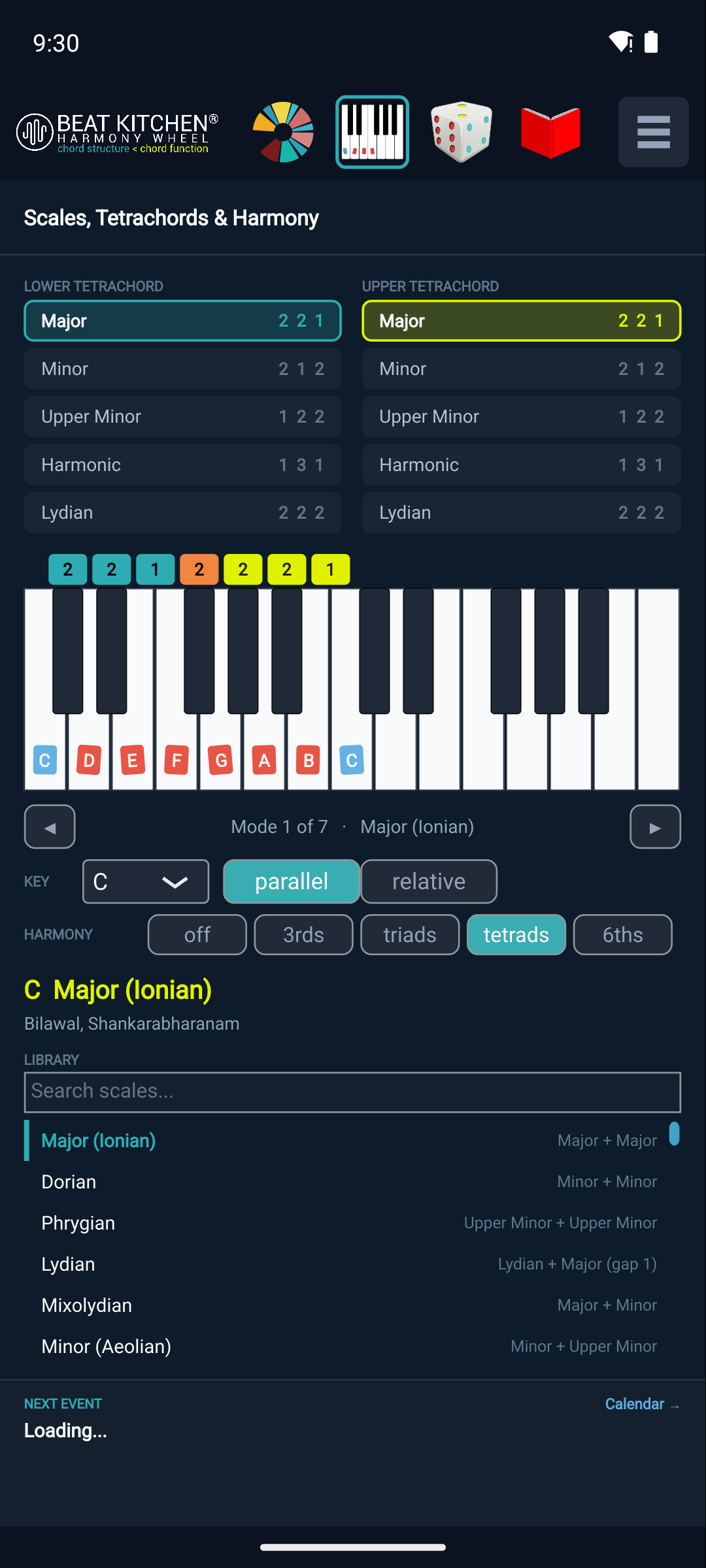
Build from two halves
Pick a Key (the root), then choose a lower and an upper tetrachord from five building blocks:
- Major
[2 2 1] - Minor
[2 1 2] - Upper Minor
[1 2 2] - Harmonic
[1 3 1] - Lydian
[2 2 2]
The two halves, joined by a whole step, close the octave. Combine them and you get named scales:
- Major + Major = Ionian (the major scale)
- Upper Minor + Upper Minor = Phrygian
- Lydian + Major = Lydian
That last building block, the Lydian tetrachord, earns its place because Lydian + Lydian builds the whole-tone scale — something none of the others can make. (The naming follows common-practice convention: “Upper Minor,” not “Phrygian tetrachord.”)
Parallel and relative
Two buttons move you between related scales the way the wheel’s spaces do:
- Parallel keeps the root and changes the flavor (C major → C minor).
- Relative keeps the notes and moves the root (C major → A minor).
Stepping the modes
Use Mode ◀ / ▶ to walk through the seven modes of the current scale — the readout names where you are (“Mode 1 of 7 · Major (Ionian)”). It’s the fastest way to hear how Dorian differs from Aeolian, or why Lydian sounds bright: same notes, different starting point, played back so you can compare.
Harmonize it
The Harmony selector — off / 3rds / triads / tetrads / 6ths — stacks harmony on each scale tone (tetrads by default). Instead of a bare scale you hear the chords the scale generates, which is how you connect a scale to the progressions it implies.
The scale library
Don’t want to build from scratch? The scale library lists named scales — Ionian, Dorian, Phrygian, Lydian, Mixolydian, Aeolian, and more — each labeled with its tetrachord construction, and a search box filters by name. Pick one and the toolkit loads its tetrachords so you can see how it’s built.
The keyboard below plays the scale tones on the on-device synth, with each key labeled for the current key.
What to Practice
- Build Major + Major in C, then swap the upper half to Upper Minor and hear it become Mixolydian.
- Set a major scale and step Mode ▶ through all seven — name each as you go.
- Turn Harmony to tetrads and play the scale to hear the seventh chords it produces.
- Search the library for “Lydian” and read its tetrachord construction.
Search This Guide
This Course
- 1. What the Harmony Wheel Is
- 2. Reading a Chord — Wedges and Function
- 3. Harmonic Spaces
- 4. Finding the Key — Listen Mode and the Key Tracker
- 5. The Keyboard and Enharmonic Spelling
- 6. Mic, Speaker, Bonus Wedges, and the Legend
- 7. The Tetrachord Toolkit
- 8. The Random Chord Generator
- 9. The Built-in Guidebook
- 10. Options and Settings
When you're ready to take the next step, it starts with a place where you can ask questions. We teach live — small group, cameras optional, taught by someone who gives a shit.
Find Out How You Can Join Us →© 2026 Beat Kitchen School — beatkitchen.io. All rights reserved. Unauthorized reproduction or distribution of this material is prohibited.