What the Harmonic Synth Is
Pick a note on any instrument — a string, a voice, a saxophone — and you’re not hearing one frequency. You’re hearing a stack: the fundamental at the bottom, and a series of quieter tones above it vibrating at whole-number multiples. That stack is the harmonic series — covered from the ground up in the Mixing & Synthesis guide — and the particular mix of overtones is what makes a violin sound like a violin and not a flute.
BKS Harmonic is built directly on that idea. Instead of starting with a finished waveform and carving it down with a filter, you start with the partials themselves and decide which are present, how loud they are, and where they sit. That’s additive synthesis — building a sound up from sine waves instead of subtracting from something rich. It began as a teaching tool for exactly this point, then grew into a synth you can produce with.
The whole instrument at a glance
It’s a big synth, so here’s the entire layout in one shot. Don’t try to absorb it all — this is a map you’ll come back to. Each numbered region gets its own chapter.
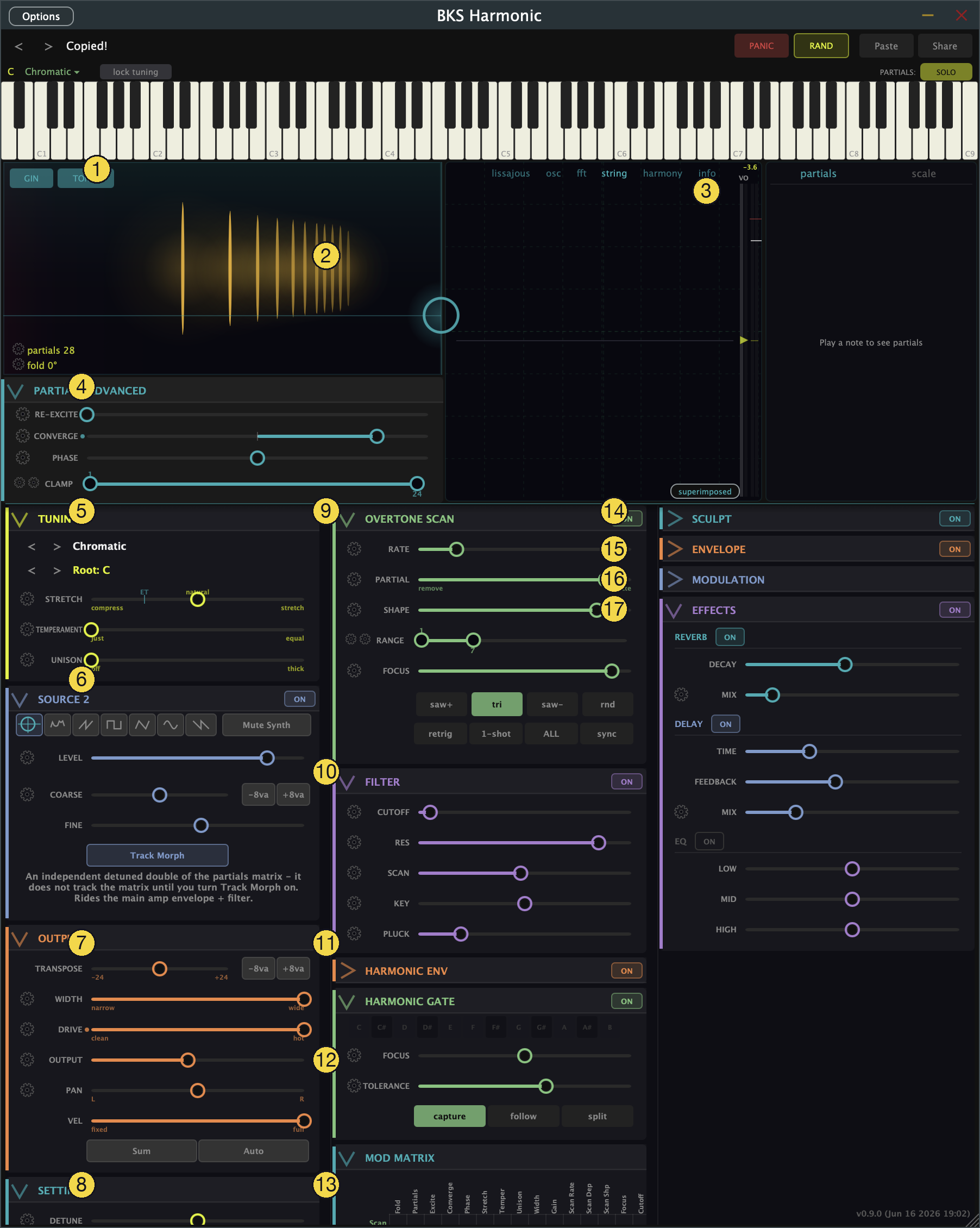
- Gin / Tonic — admit and anchor the sub-fundamental layers that Fold creates.
- Partials Matrix — the source. Drag the dot: up/down sets how many partials are open, left/right is Fold.
- Scope — see the sound: oscilloscope, FFT, vibrating string, harmony, and a per-partial info readout.
- Partials Advanced — Re-excite, Converge, Phase, and Clamp: finer shaping of the spectrum.
- Tuning — Stretch (inharmonicity), Temperament (just ↔ equal), Unison, scale and key.
- Source 2 — a second layer under the partials: noise, oscillators, or a detuned double of the matrix.
- Output — Transpose, Width, Drive, Output level, Pan, Velocity.
- Settings — Detune, Glide, Bend range, Polyphony, Mono, diagnostics.
- Overtone Scan — a moving spotlight that sweeps across the partials.
- Filter — Cutoff, Resonance, Track, Key, Pluck.
- Harmonic Envelope — a second envelope shaping just a chosen group of partials.
- Harmonic Gate — boosts the partials that match the chord or scale you’re playing.
- Mod Matrix — route any modulation source to almost any destination.
- Sculpt — per-partial level bars, Morph between waveshapes, Blend toward resonant noise, Air.
- Envelope — the main amplitude envelope (ADSR, plus Fade, VCA, and VCF amounts).
- Modulation — the second LFO and second envelope.
- Effects — EQ, Delay, Reverb.
(Across the top: the keyboard, and the transport buttons — PANIC to kill stuck notes, RAND to randomize a patch, Paste/Share to load and copy patches as a link.)
How it fits together
The trick to not getting lost is to know the signal flow. Almost everything in this synth acts on the partials, in roughly this order:
- The partials matrix (2) generates the raw spectrum. Gin/Tonic (1), Partials Advanced (4), and Tuning (5) shape what those partials are — how they fold, spread, and tune.
- Sculpt (14) then sets each partial’s level, morphs the stack toward classic waveshapes, and can crossfade the whole thing from pure partials into resonant noise. Source 2 (6) can layer a second sound underneath.
- Three modules shape the partials over time or by harmony: the Overtone Scan (9) sweeps a spotlight across them, the Harmonic Envelope (11) gives a chosen group its own attack and release, and the Harmonic Gate (12) leans on whichever partials match the chord you’re holding.
- The result passes through the Filter (10), gets its volume shaped by the main Envelope (15), and is finished by Output (7) and Effects (17).
- Tying it together, Modulation (16) and the Mod Matrix (13) can drive almost any continuous control — so a patch isn’t static; it moves.
You don’t need all of it to make a sound. The matrix alone will get you a long way. The rest is there for when you want to reach in further.
What to Practice
- Open the synth and play a note. Find the partials matrix (2) and drag the dot around — that’s the source of everything else.
- Tap the scope (3) and switch between its views while you play. Watching the sound is half of learning this instrument.
- Come back to the map above whenever a chapter mentions a module and you’re not sure where it lives.
Search This Guide
This Course
- 1. What the Harmonic Synth Is
- 2. The Partials Matrix
- 3. Fold, Gin, and Tonic
- 4. Seeing Sound — the Scope
- 5. Partials Advanced
- 6. Sculpt — Shaping the Spectrum
- 7. The Overtone Scan
- 8. The Harmonic Envelope
- 9. The Harmonic Gate
- 10. Tuning — Stretch, Temperament, and Unison
- 11. Source 2 — the Second Layer
- 12. The Filter
- 13. The Envelope
- 14. Modulation — Making It Move
- 15. Output
- 16. Effects
- 17. Presets, Settings, and the Top Bar
- 18. Audio In and Resynthesis
When you're ready to take the next step, it starts with a place where you can ask questions. We teach live — small group, cameras optional, taught by someone who gives a shit.
Find Out How You Can Join Us →© 2026 Beat Kitchen School — beatkitchen.io. All rights reserved. Unauthorized reproduction or distribution of this material is prohibited.