Presets, Settings, and the Top Bar
The last things to know aren’t sound-design at all — they’re how you move patches around, recover when something goes sideways, and set the player feel. Most live in the top bar; the rest are in Settings.
The top bar
Running across the top of the synth:
- PANIC — kills every sounding note. The button you reach for when a note hangs or feedback builds. No side effects; it just stops the sound.
- RAND — randomizes the patch. A fast way to stumble into something you’d never have dialed up by hand — a great starting point to then sculpt.
- Share — copies the entire current patch as a
beatkitchen.io/synth#…link to your clipboard. Every parameter is in that URL. - Paste — loads a patch from a share link on your clipboard. This is how patches travel: someone copies, you paste, and you’ve got their exact sound.
- Preset
< >— steps through the cloud preset list (fetched when the synth launches). The quickest way to hear what the instrument can do. - PARTIALS: SOLO — the mode from the partials-matrix chapter: with it on, hovering a key isolates or mutes individual partials so you can hear each one.
- lock tuning — pins just intonation to the scale root (the key) instead of letting it float to the lowest note you’re holding. Turn it on when you’re playing in a fixed key and want consistent tuning across chords.
Sharing patches
Because a whole patch fits in a link, sharing is trivial: hit Share, and the link is on your clipboard — drop it in Discord, a notes file, anywhere. To load one, copy the link and hit Paste. There’s no file to manage and nothing to install; the URL is the patch. It’s also how the preset-sharing community works — the synth’s sounds get better as people trade links.
Settings
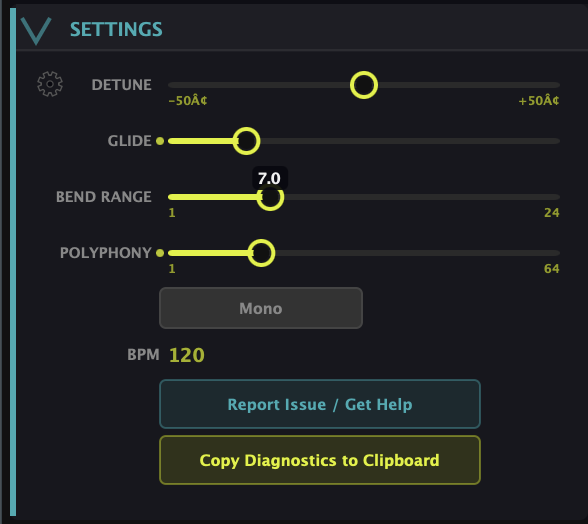
The Settings panel holds the player-feel controls:
- Detune — a global fine detune for the whole instrument.
- Glide — portamento: how long the pitch slides from one note to the next. Off for clean playing, up for a sliding, vocal feel (especially in Mono).
- Bend Range — how many semitones the pitch wheel reaches.
- Polyphony — how many notes can sound at once (up to 64).
- Mono — collapses the synth to one voice at a time, for leads and basses where you want glide and a single-note feel.
- BPM — the tempo reference for tempo-synced rates (when not hosted in a DAW).
- Report Issue / Get Help and Copy Diagnostics to Clipboard — your line to support. If something’s wrong, Copy Diagnostics grabs the technical details to send along.
What to Practice
- Hit RAND a few times, find something you half-like, then sculpt it into a real patch.
- Share a patch to yourself, clear the synth, and Paste it back — that round trip is the whole sharing workflow.
- Turn on Mono and add some Glide for a sliding lead, then switch back to poly for chords.
Search This Guide
This Course
- 1. What the Harmonic Synth Is
- 2. The Partials Matrix
- 3. Fold, Gin, and Tonic
- 4. Seeing Sound — the Scope
- 5. Partials Advanced
- 6. Sculpt — Shaping the Spectrum
- 7. The Overtone Scan
- 8. The Harmonic Envelope
- 9. The Harmonic Gate
- 10. Tuning — Stretch, Temperament, and Unison
- 11. Source 2 — the Second Layer
- 12. The Filter
- 13. The Envelope
- 14. Modulation — Making It Move
- 15. Output
- 16. Effects
- 17. Presets, Settings, and the Top Bar
- 18. Audio In and Resynthesis
When you're ready to take the next step, it starts with a place where you can ask questions. We teach live — small group, cameras optional, taught by someone who gives a shit.
Find Out How You Can Join Us →© 2026 Beat Kitchen School — beatkitchen.io. All rights reserved. Unauthorized reproduction or distribution of this material is prohibited.