The Overtone Scan
A sound that never changes gets old fast. The overtone scan is the first tool BKS Harmonic gives you for putting movement into a patch — and like everything else here, it works at the level of the partials.
Here’s the part to get straight up front, because it’s easy to mishear: the overtone scan is not an arpeggiator. It isn’t playing little notes on top of your sound. It’s sweeping focus across the partials that are already in the stack — bringing them up, one region at a time, and letting them fall back. The components were always there. The scan just decides which ones you’re hearing most, moment to moment.
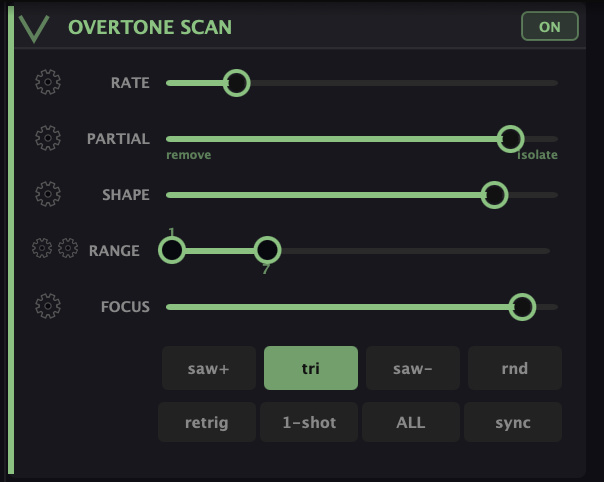
If you’ve ever swept a narrow EQ boost across a sound, it has that flavor — except instead of crawling across raw frequencies, it’s stepping through harmonics, so the movement stays musical. Turn it on over a full sawtooth and you get a vocal, talking quality as the focus walks up and down the series.
The controls
The scan gives you a handful of parameters:
- Rate — how fast the spotlight steps through the partials (use sync to lock it to your host tempo).
- Partial — what the spotlight does to the partial it lands on: drag left to remove that partial, right to isolate (solo) it. This is the difference between a scan that carves notches and one that picks single harmonics out.
- Shape — the spotlight’s width: narrow for a sharp step from partial to partial, wide for a smooth sweep.
- Range — the floor and ceiling partials the sweep travels between. Keep it low for subtle movement or open it across the whole stack for something dramatic.
- Focus — how hard the partials outside the range get ducked. More focus isolates the swept region; less lets the rest of the sound through underneath.
Below the sliders are the sweep shapes — saw+ (ascending ramp), tri (up-and-down), saw− (descending), rnd (random) — and the trigger modes: retrig restarts the sweep on each new note, 1-shot sweeps once and stops, ALL runs free without resetting per note, and sync locks the rate to tempo.
Set the range narrow with a tight shape and you get a clear, pitched sweep. Open the range, widen the shape, and back off the focus and it becomes a slow tidal motion across the whole sound.
It’s also LFO 1
Under the hood, the overtone scan is the synth’s LFO 1. That’s worth knowing for two reasons. First, it means the scan can be routed like any other modulation source if you want it driving something elsewhere in the synth. Second, it means that when you go looking at the modulation system later and wonder why LFO 1 seems to already be doing something — it’s this. (Modulation gets its own chapter; for now, just file away that the scan and LFO 1 are the same thing.)
What to Practice
- Build a full sawtooth in the partials matrix, then turn on the overtone scan with a wide range and a slow speed. Listen to the focus walk up and down the harmonics.
- Tighten the focus and shorten the range to the bottom few partials. Notice how it goes from a broad swell to a clear, pitched sweep.
- Try a fast speed with a narrow focus for a shimmering, restless texture — then slow it down and hear the same patch turn into something that breathes.
Search This Guide
This Course
- 1. What the Harmonic Synth Is
- 2. The Partials Matrix
- 3. Fold, Gin, and Tonic
- 4. Seeing Sound — the Scope
- 5. Partials Advanced
- 6. Sculpt — Shaping the Spectrum
- 7. The Overtone Scan
- 8. The Harmonic Envelope
- 9. The Harmonic Gate
- 10. Tuning — Stretch, Temperament, and Unison
- 11. Source 2 — the Second Layer
- 12. The Filter
- 13. The Envelope
- 14. Modulation — Making It Move
- 15. Output
- 16. Effects
- 17. Presets, Settings, and the Top Bar
- 18. Audio In and Resynthesis
When you're ready to take the next step, it starts with a place where you can ask questions. We teach live — small group, cameras optional, taught by someone who gives a shit.
Find Out How You Can Join Us →© 2026 Beat Kitchen School — beatkitchen.io. All rights reserved. Unauthorized reproduction or distribution of this material is prohibited.