
The Partials Matrix
This is the part of the synth everything else is built around — the glowing pad at the top-left, where a single dot does most of the work. The partials matrix sets the raw spectrum of your sound: which harmonics are present and how they’re stacked. Drag the dot and the readout below it tells you exactly where you are — partials 28, fold 0°.
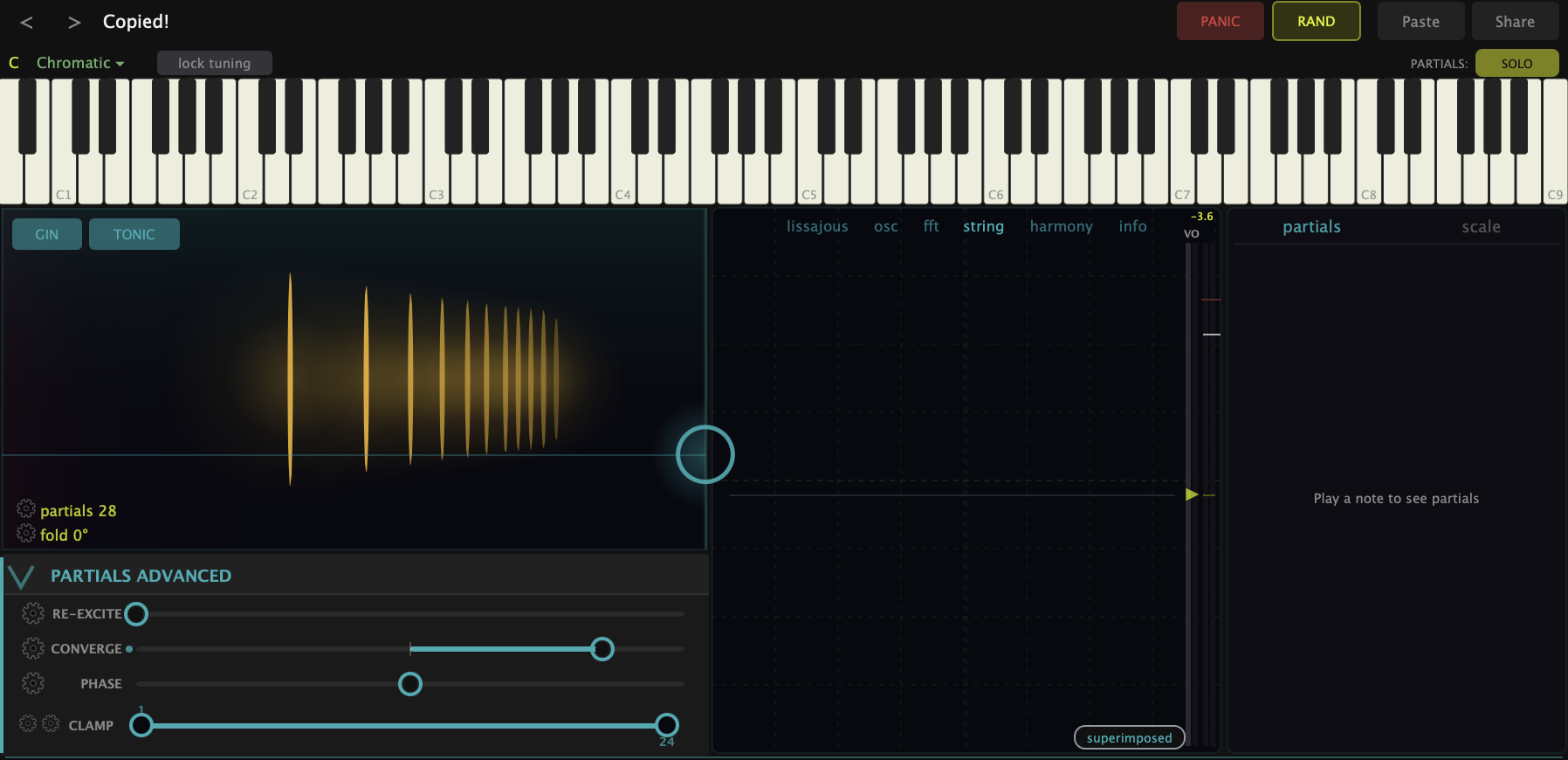
The dot moves in two directions, and each one means something different:
- Vertical — Partials. How many harmonics are open. Drag the dot down and you strip the sound back toward the fundamental alone: one partial, a pure sine wave. Drag it up and more harmonics open up, one after another, until the full 24-partial stack is sounding — rich and bright. This is the dimension that takes you from a flute-like purity to a buzzy sawtooth.
- Horizontal — Fold. How far the harmonic series folds across octave layers. We’ll come back to this in its own chapter (it’s the heart of gin and tonic) — for now, just know the left-right axis is doing something different from the up-down one.
The bars glowing behind the dot aren’t decoration — they’re the actual levels of each partial as you play. When you move the dot, you’re watching the spectrum rebuild in real time.
A sawtooth is a recipe
Open all the partials and you’ve built a sawtooth wave — not because the synth drew that shape, but because a sawtooth is the full harmonic series stacked up in the right proportion. Watch the scope while you drag the dot up: down low it’s a smooth sine curve, and as the partials open it sharpens into the slanted ramp of a sawtooth. You’re never editing the waveform directly. You’re choosing which harmonics are in the stack, and the shape follows.
That’s the mental shift this synth asks for. A sound isn’t a shape you filter — it’s a set of partials you assemble.
Hearing the pieces — Solo mode
It’s one thing to see the partials and another to hear them. Up in the top bar there’s a PARTIALS button that flips into SOLO mode. With it on, hover a lit key on the keyboard and you can isolate or mute partials one at a time — hearing the fundamental on its own, then the octave above, then the fifth above that, on up the series. That climb is the harmonic series, audible one rung at a time.
Pull the fundamental and the sound goes thin and hollow; bring back an upper partial and the top gets its air back. Most synths bury this behind a filter. Here it’s the main event, and a few minutes in solo mode does more for your ear than any amount of reading.
What to Practice
- Hold a note and drag the matrix dot straight up and down. Listen for the sine wave thickening into a sawtooth, and watch the bars and the scope rebuild as you go.
- Drop the dot all the way down for a pure sine, then open it just a little — two or three partials. That sparse setting is the starting point for a lot of the synth’s best sounds.
- Turn on PARTIALS: SOLO and walk up the partials one at a time. See if you can hear the octave, then the fifth, then the next octave.
- Leave the horizontal axis alone for now. Once you’ve got a feel for opening and closing partials, the next chapters add the moves that make this synth unlike any other.
Search This Guide
This Course
- 1. What the Harmonic Synth Is
- 2. The Partials Matrix
- 3. Fold, Gin, and Tonic
- 4. Seeing Sound — the Scope
- 5. Partials Advanced
- 6. Sculpt — Shaping the Spectrum
- 7. The Overtone Scan
- 8. The Harmonic Envelope
- 9. The Harmonic Gate
- 10. Tuning — Stretch, Temperament, and Unison
- 11. Source 2 — the Second Layer
- 12. The Filter
- 13. The Envelope
- 14. Modulation — Making It Move
- 15. Output
- 16. Effects
- 17. Presets, Settings, and the Top Bar
- 18. Audio In and Resynthesis
When you're ready to take the next step, it starts with a place where you can ask questions. We teach live — small group, cameras optional, taught by someone who gives a shit.
Find Out How You Can Join Us →© 2026 Beat Kitchen School — beatkitchen.io. All rights reserved. Unauthorized reproduction or distribution of this material is prohibited.