The Filter
After all the spectral shaping, the sound passes through a conventional output Filter. If you’ve used any synth, the first two controls will feel like home — but three of the five tie the filter into the rest of BKS Harmonic in ways worth knowing.
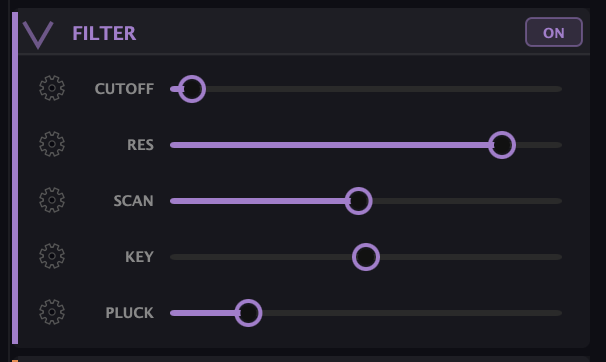
- Cutoff — brightness. Lower it to darken the sound, raise it to open it up. The everyday tone control.
- Res (resonance) — emphasis right at the cutoff. A touch adds focus; push it and the filter starts to ring and sing at the cutoff frequency.
- Scan — ties the cutoff to the Overtone Scan: the filter’s cutoff follows the scanner’s current partial frequency, so the filter sweeps in lockstep with the spotlight moving across the partials. It only does anything with the Scan running — but together they make a moving, resonant sweep that tracks the harmonics instead of just gliding through frequencies.
- Key — keyboard tracking. With Key up, the cutoff follows the pitch you play: higher notes get a brighter filter, lower notes darker, so a sound keeps a consistent character up and down the keyboard. At 1.0 the cutoff moves an octave per octave (referenced to C3).
- Pluck — bypasses the filter for the very start of each note, so the attack comes through bright before the filter closes back down. A fast, built-in way to get a percussive, plucked transient without automating the cutoff yourself.
A note on filter type
The lowpass / bandpass / highpass type selector belongs to Source 2’s filter, not this one — the main output filter here is a cutoff-and-resonance design. If you’re after a bandpass or highpass character on the main sound, that’s a job for Source 2 or for sculpting the partials directly.
What to Practice
- Bring Cutoff down and add a little Res for a classic dark, focused tone.
- Turn on the Overtone Scan, then raise Scan here — hear the filter sweep follow the scanner across the partials.
- Add some Pluck to a sustained patch and play staccato. Each note gets a bright, percussive front edge.
Search This Guide
This Course
- 1. What the Harmonic Synth Is
- 2. The Partials Matrix
- 3. Fold, Gin, and Tonic
- 4. Seeing Sound — the Scope
- 5. Partials Advanced
- 6. Sculpt — Shaping the Spectrum
- 7. The Overtone Scan
- 8. The Harmonic Envelope
- 9. The Harmonic Gate
- 10. Tuning — Stretch, Temperament, and Unison
- 11. Source 2 — the Second Layer
- 12. The Filter
- 13. The Envelope
- 14. Modulation — Making It Move
- 15. Output
- 16. Effects
- 17. Presets, Settings, and the Top Bar
- 18. Audio In and Resynthesis
When you're ready to take the next step, it starts with a place where you can ask questions. We teach live — small group, cameras optional, taught by someone who gives a shit.
Find Out How You Can Join Us →© 2026 Beat Kitchen School — beatkitchen.io. All rights reserved. Unauthorized reproduction or distribution of this material is prohibited.