Modulation — Making It Move
This is the section that turns a static patch into a living one. Nearly every continuous control in BKS Harmonic can be driven by something else — an LFO, an envelope, how hard you played, the mod wheel — and the Modulation section plus the Mod Matrix is where you wire that up.
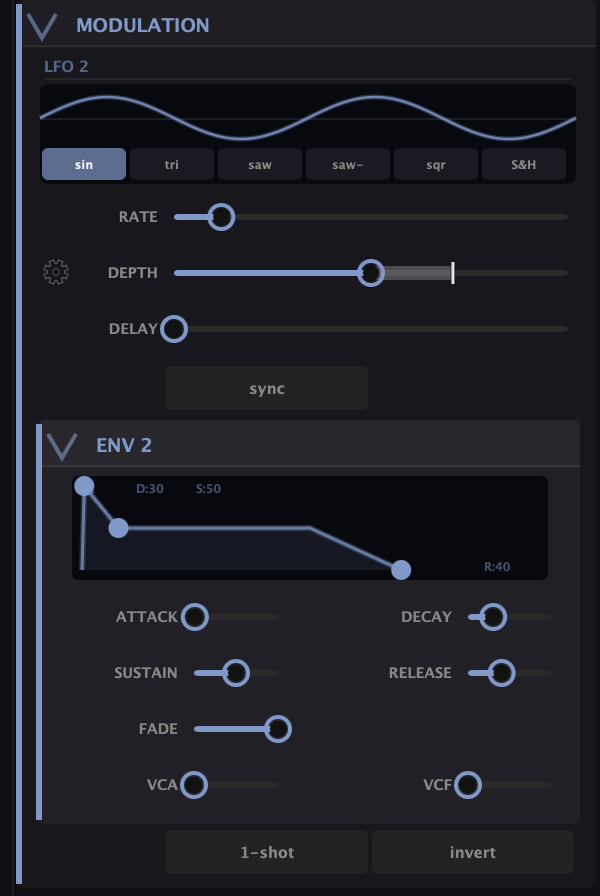
The sources
You already have two without coming here: LFO 1 (which is the Overtone Scan) and Env 1 (the main envelope). The Modulation section adds two more:
- LFO 2 — a second low-frequency oscillator with a choice of shapes (sin, tri, saw, saw−, sqr, S&H) and Rate, Depth, and Delay (Delay eases it in after the note starts). Sync locks the rate to host tempo.
- Env 2 — a second full envelope (ADSR, Fade, plus its own VCA/VCF contribution amounts, and 1-shot/invert), free to drive anything since the main envelope is busy on the amp.
On top of those, the matrix offers performance sources: Velocity, Mod Wheel, Aftertouch, Expression, Pitch Bend, and Note — so the sound can respond to how and what you play.
The Mod Matrix
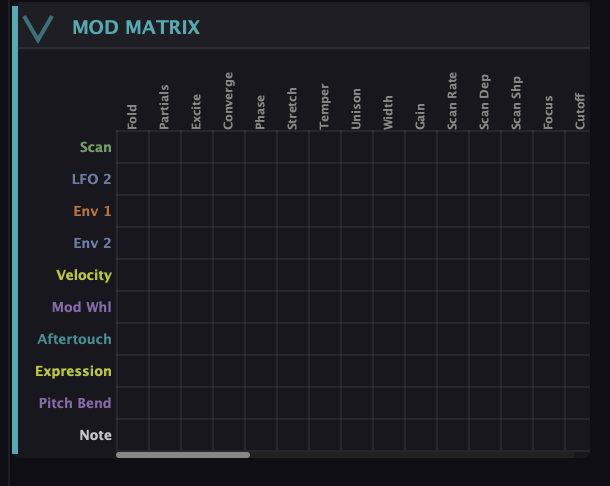
The matrix is a grid: sources down the side, destinations across the top. The destinations are the controls that make this synth special — Fold, Partials, Converge, Phase, Stretch, Morph, Blend, Air, Cutoff, the Scan’s own settings, and more.
Routing is direct:
- Click a cell where a source row meets a destination column to create a route.
- Drag the cell up or down to set the amount and polarity (up for positive, down for inverted).
- Click it again to remove the route.
That’s the whole interaction. Want the mod wheel to open the Fold? Find the Mod Wheel row, the Fold column, click, drag up. Done.
The shortcut: gear icons
You don’t always need the grid. Every slider in the synth has a small gear icon next to it — click it for a quick per-control modulation assign and amount, right where the control lives. It’s the fast path for “I want this knob to wiggle” without hunting through the matrix.
Where to point it
The destinations are the payoff. Put an LFO on Fold for a sweep that moves harmonics between octaves; velocity on the Harmonic Envelope’s Depth so harder notes bloom brighter; an envelope on Blend so a note starts as a clean tone and breathes into resonant noise; the mod wheel on Morph to reshape the waveform live. The modules in this guide are the what; modulation is the when.
What to Practice
- Route LFO 2 to Cutoff for a classic filter wobble — set the shape to sin and the rate slow.
- Click the gear icon next to the Fold readout and assign an envelope to it. Hear each note fold as it plays.
- Send Velocity to the Harmonic Envelope’s Depth so dynamics control the timbre, not just the volume.
Search This Guide
This Course
- 1. What the Harmonic Synth Is
- 2. The Partials Matrix
- 3. Fold, Gin, and Tonic
- 4. Seeing Sound — the Scope
- 5. Partials Advanced
- 6. Sculpt — Shaping the Spectrum
- 7. The Overtone Scan
- 8. The Harmonic Envelope
- 9. The Harmonic Gate
- 10. Tuning — Stretch, Temperament, and Unison
- 11. Source 2 — the Second Layer
- 12. The Filter
- 13. The Envelope
- 14. Modulation — Making It Move
- 15. Output
- 16. Effects
- 17. Presets, Settings, and the Top Bar
- 18. Audio In and Resynthesis
When you're ready to take the next step, it starts with a place where you can ask questions. We teach live — small group, cameras optional, taught by someone who gives a shit.
Find Out How You Can Join Us →© 2026 Beat Kitchen School — beatkitchen.io. All rights reserved. Unauthorized reproduction or distribution of this material is prohibited.