Loading...
w/ ---
00:
00:
00:
00
Get Started

Calendar
View upcoming events and classes
My Portal
My Residency
Information Panel
Beat Kitchen at-a-glance

Chapter 15
Output
The Output section is the last thing the sound passes through before it leaves the synth — level, stereo, and a few finishing touches.
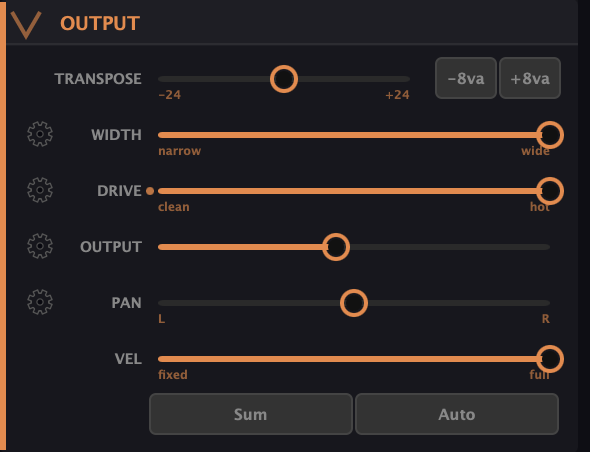
- Transpose — shifts pitch in semitones, with −8va / +8va buttons for exact octave jumps. It applies to new notes; notes you’re already holding keep their pitch.
- Width — stereo spread. As you widen it, the synth places odd and even partials to the left and right, so the spread comes from the harmonic content itself rather than a generic stereo effect. Narrow for a focused mono-ish center, wide for a big stereo image.
- Drive — saturation. From clean to hot, it adds warmth and grit, rounding off the purity of the additive engine when you want some analog dirt.
- Output — the master level of the patch.
- Pan — left/right placement.
- Vel — how much velocity affects volume. At fixed, every note plays at the same level regardless of how hard you hit it (organ-style); toward full, dynamics come through. Note this is about volume — velocity can be routed to other destinations in the mod matrix independently.
Sum and Auto
Two buttons handle housekeeping:
- Sum — collapses the output to mono, for checking mono compatibility or when you want a centered sound.
- Auto — auto-gain. It normalizes the patch’s loudness so sounds sit at a consistent level instead of jumping in volume as you browse presets or rebuild a patch. Handy when you’re sound-designing and the level keeps changing under you.
What to Practice
- Widen Width on a rich, many-partial patch and listen to the stereo image open up as the harmonics spread.
- Add Drive to a clean tone until it has some warmth, then push it hot for grit.
- Set Vel to fixed for an organ feel, then to full and play with dynamics — same patch, very different response.
Search This Guide
This Course
- 1. What the Harmonic Synth Is
- 2. The Partials Matrix
- 3. Fold, Gin, and Tonic
- 4. Seeing Sound — the Scope
- 5. Partials Advanced
- 6. Sculpt — Shaping the Spectrum
- 7. The Overtone Scan
- 8. The Harmonic Envelope
- 9. The Harmonic Gate
- 10. Tuning — Stretch, Temperament, and Unison
- 11. Source 2 — the Second Layer
- 12. The Filter
- 13. The Envelope
- 14. Modulation — Making It Move
- 15. Output
- 16. Effects
- 17. Presets, Settings, and the Top Bar
- 18. Audio In and Resynthesis
When you're ready to take the next step, it starts with a place where you can ask questions. We teach live — small group, cameras optional, taught by someone who gives a shit.
Find Out How You Can Join Us →© 2026 Beat Kitchen School — beatkitchen.io. All rights reserved. Unauthorized reproduction or distribution of this material is prohibited.