The Harmonic Gate
This is the most theory-aware module in the synth, and the clearest example of what “music-theory-aware synthesis” actually means. The Harmonic Gate looks at the pitch class of every partial in your sound and boosts the ones that match the chord or scale you’re playing — so the timbre itself reinforces the harmony. Play in key, and the sound leans into the notes that belong.
How it works
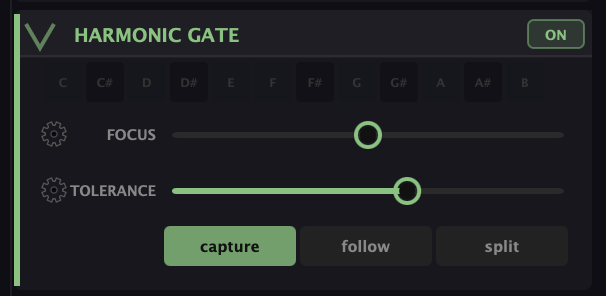
Every partial sits at some pitch. The gate compares each one against a set of “allowed” pitch classes and boosts the matches. Where those allowed classes come from depends on the mode:
- Capture — grab the pitch classes of the chord you’re currently holding and lock them in as the gate’s target. Hold a Cmaj7, hit Capture, and from then on the partials matching C–E–G–B get reinforced.
- Follow — the gate tracks whatever you play live, updating as the chord changes underneath your hands. The timbre stays glued to the harmony in real time.
- Split — a keyboard split: notes on one side run through the gate, notes on the other bypass it, so you can play gated and ungated zones at once.
The pitch-class row (C, C♯, D … B) shows and lets you set which classes are active.
The two dials
- Focus — how hard the matching partials are boosted. A little Focus is a gentle bias toward in-key harmonics; a lot makes the gate dramatic, almost vowel-like, as the out-of-key partials drop away.
- Tolerance — how strict the match is, in cents. Tight tolerance only accepts partials right on pitch; loose tolerance lets near-misses through, which matters once you’re using Stretch or just intonation and partials drift off the equal-tempered grid.
Why it’s worth knowing
On most synths, timbre and harmony are separate departments — you pick a sound, then you play notes. Here they talk to each other. Put the gate in Follow with a moderate Focus and play a progression: the sound brightens on chord tones and pulls back on the rest, so the instrument seems to know the song. It’s the synth equivalent of a player who voices to the changes.
What to Practice
- Hold a chord, hit Capture, then play around it. Hear the partials matching your chord tones pop forward.
- Switch to Follow and play a four-chord progression. The timbre should shift with each chord.
- Push Focus up for an exaggerated, formant-like version, then ease Tolerance looser if you’re using Stretch or just intonation.
Search This Guide
This Course
- 1. What the Harmonic Synth Is
- 2. The Partials Matrix
- 3. Fold, Gin, and Tonic
- 4. Seeing Sound — the Scope
- 5. Partials Advanced
- 6. Sculpt — Shaping the Spectrum
- 7. The Overtone Scan
- 8. The Harmonic Envelope
- 9. The Harmonic Gate
- 10. Tuning — Stretch, Temperament, and Unison
- 11. Source 2 — the Second Layer
- 12. The Filter
- 13. The Envelope
- 14. Modulation — Making It Move
- 15. Output
- 16. Effects
- 17. Presets, Settings, and the Top Bar
- 18. Audio In and Resynthesis
When you're ready to take the next step, it starts with a place where you can ask questions. We teach live — small group, cameras optional, taught by someone who gives a shit.
Find Out How You Can Join Us →© 2026 Beat Kitchen School — beatkitchen.io. All rights reserved. Unauthorized reproduction or distribution of this material is prohibited.