This is the most misunderstood part of the synth, so lead with the one thing that clears it up:
Audio In is not a playback sampler. When you load or record a sound, BKS Harmonic doesn’t play it back — it analyzes it into partials and feeds those into the partials matrix. The sound is a primer that turns the instrument into an audio effect: everything you’ve learned — fold, converge, stretch, the harmonic envelope, gin and tonic — now applies to your sound. So when you load a file, press a key, and “hear the synth too,” that’s working as designed: you’re playing the resynthesized partials through the engine. How much you hear of the raw sample versus the synthesized version is the Re-synth slider.
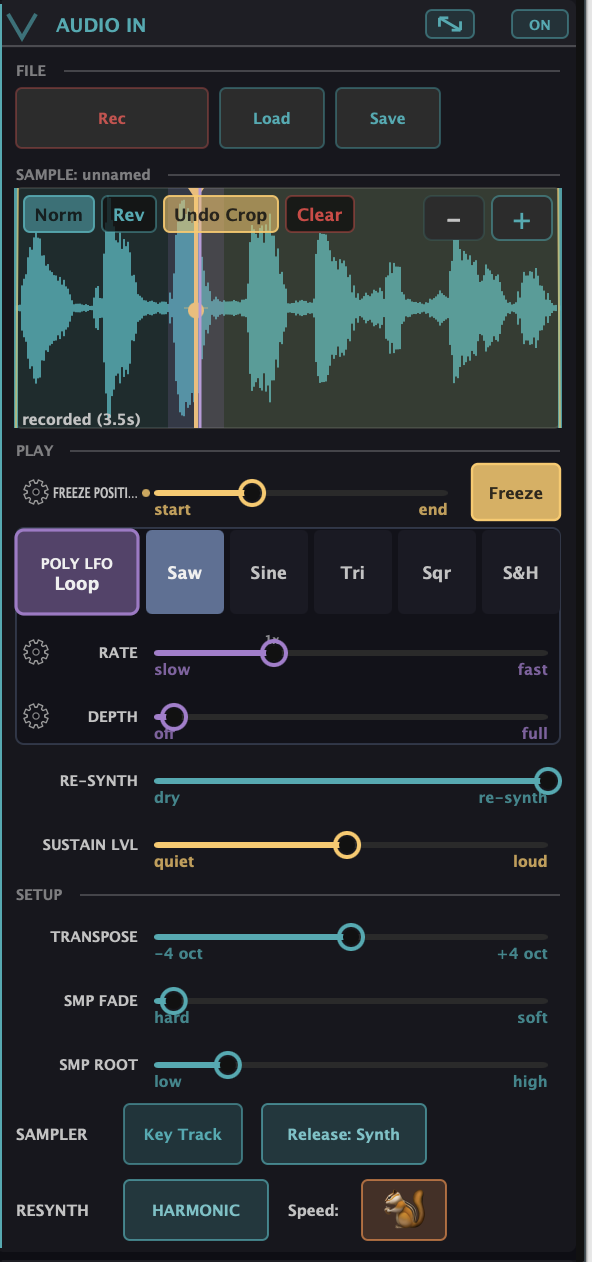
The shape of the module
The module reads top to bottom in the order you actually use it:
- File — Rec (record a short clip from the live input), Load (open a WAV/AIFF), Save.
- The waveform — your loaded sound. Drag the edges to trim, drag the warm marker to set the Freeze point. The small buttons inside the waveform are the edit tools: Norm (normalize), Rev (reverse — the view flips so you can see it), Crop (permanently keep just the trimmed slice), and Clear (unload the sample). Dragging a trim handle across a button won’t trip it.
- Play — the controls you perform with: Freeze, the Poly LFO, Re-synth, Sustain.
- Setup — the set-once controls: Transpose, Fade, Root, and the Key Track / Release / RESYNTH toggles.
The play controls
- Re-synth — blends dry sample ↔ synthesized. This is the main “am I hearing the effect?” control. All the way dry it’s close to the original; as you bring it up, the synth engine takes over and the matrix moves start to bite.
- Freeze Position + Freeze — the freeze sets a static sustain position: instead of playing forward, the engine holds the partials at one spot in the sound. The gold marker on the waveform is the Freeze Position; the Freeze button arms it. Sustain Lvl sets how loud the held part is versus the attack (good for percussive or drop-out patches), and Release (in Setup) chooses whether note-off plays out the frozen tone or the sample’s tail.
- Poly LFO — the freeze point doesn’t have to sit still. The Poly LFO is a per-voice LFO — every held note runs its own copy — that scrubs the Freeze position back and forth, so a held chord drifts and evolves instead of standing still. Pick its shape (Saw / Sine / Tri / Sqr / S&H); the POLY LFO button itself cycles the Mode — Off, 1-Shot (one pass per note, then hold), or Loop (keeps moving while held). Rate sets the speed, Depth the width of the scrub (the violet band on the waveform shows the range). Both Rate and Depth are mod-matrix destinations, so you can modulate the movement itself. This is the fastest route to a living, evolving pad.
The setup controls
- Key Track — lit (default), the sample transposes with the played key, like a normal sampler. Turn it off and the sample plays at one fixed pitch across the whole keyboard — hold a chord and every note layers the same texture, which is exactly what you want for drones and pads.
- Transpose / Root — where the sound sits in pitch. The engine auto-detects pitch on import (and can land an octave off), so Transpose doubles as your pitch-correction knob; Root is the key that plays the sound at its natural pitch.
- Fade — a short crossfade that smooths the loop/trim edges so boundaries don’t click.
- RESYNTH → Freq Source (Harmonic / Inharmonic) — how the detected partials get mapped. Harmonic: partials snap to the integer-harmonic grid (2×, 3×, 4× the fundamental) — right for pitched material. Inharmonic: partials sit on the actual detected spectral peaks — use it for inharmonic or oddly-pitched sources (speech, a bell, a crow, a lawnmower). It’s a mode, not a wet/dry amount.
- RESYNTH → Speed (🔒 / 🐿️) — couples pitch and speed the tape way. 🔒 Locked (default): resynthesis is pitch-independent — a sound keeps its duration up and down the keyboard. 🐿️: higher notes speed up and shorten, like a sampler or a sped-up tape.
Saving a preset with its sound
A preset that uses a loaded or recorded sound can carry that sound with it. Save it and the audio is bundled locally so recalling the preset recalls the sound, not just the settings — presets that carry audio are marked so you can spot them. To send one to someone else, Share → Include sample packages the preset and its audio into one file (a .bkpx bundle) you can AirDrop, message, or drop in Files; Preset only copies a settings link with no sound.
A note on Sculpt with a sample
Normally Sculpt is a multiplier on whatever the matrix builds. With a loaded sound the signal flow inverts: you have a fixed set of partials, each with its own envelope from Audio In, and those feed Sculpt, whose result is then dumped into the matrix. It should feel transparent while you play. If a sample patch sounds wrong or thin, a good diagnostic is to push Sculpt all the way up and see if the sound returns.
What to Practice
- Load a short, clearly-pitched sample, set Re-synth fully dry, then sweep it up — hear the synth engine take over.
- With it partly resynthesized, add some fold or converge and hear the matrix reshape your sound.
- Set a Freeze point mid-sample, then set the Poly LFO to Loop with a slow Rate and some Depth — hold a chord and listen to it evolve.
- Turn Key Track off, hold a chord, and hear the same texture layer instead of transposing — an instant drone.
- Load something inharmonic (speech, a bell) and switch Freq Source to Inharmonic — hear the partials snap to the real peaks instead of a harmonic grid.
Search This Guide
This Course
- 1. What the Harmonic Synth Is
- 2. The Partials Matrix
- 3. Fold, Gin, and Tonic
- 4. Seeing Sound — the Scope
- 5. Partials Advanced
- 6. Sculpt — Shaping the Spectrum
- 7. The Overtone Scan
- 8. The Harmonic Envelope
- 9. The Harmonic Gate
- 10. Tuning — Stretch, Temperament, and Unison
- 11. Source 2 — the Second Layer
- 12. The Filter
- 13. The Envelope
- 14. Modulation — Making It Move
- 15. Output
- 16. Effects
- 17. Presets, Settings, and the Top Bar
- 18. Audio In and Resynthesis
When you're ready to take the next step, it starts with a place where you can ask questions. We teach live — small group, cameras optional, taught by someone who gives a shit.
Find Out How You Can Join Us →© 2026 Beat Kitchen School — beatkitchen.io. All rights reserved. Unauthorized reproduction or distribution of this material is prohibited.