Source 2 — the Second Layer
Everything so far has been about the partials. Source 2 is a second sound layered underneath them — somewhere to add body, grit, or width that the additive engine alone won’t give you. Turn the module on and pick what it is.
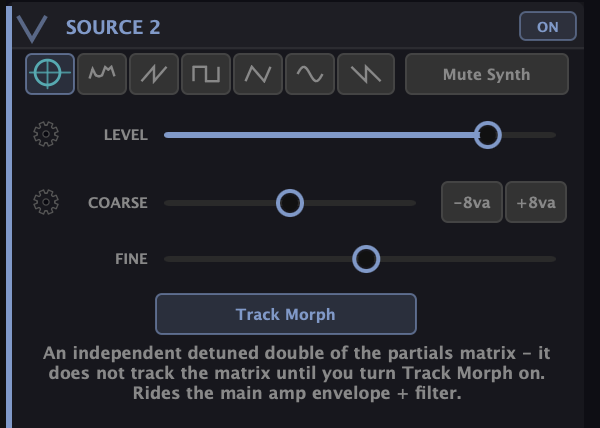
What it can be
The row of buttons at the top sets the source:
- Noise — plain noise, for adding air, breath, or a percussive transient under the pitched sound.
- An oscillator — one of five classic waveforms, for a straightforward sub or a bit of analog-style weight beneath the partials.
- The “Synth” double — the interesting one: a detuned copy of the entire partials matrix. It re-plays your whole additive patch as a second voice. On its own it doesn’t track the matrix — turn on Track Morph and the double follows the main timbre as you change it, so the two stay related instead of drifting into separate sounds.
Tuning it
Coarse transposes the layer in semitones (with octave buttons for exact jumps) — drop it an octave for a sub, or stack a fifth for a fixed harmony. Fine detunes it. In the Synth-double mode, Fine is the detune width of the doubled matrix: a few cents gives you chorus and width; zero gives a reinforcing unison. Level sets how much of Source 2 you hear against the main engine.
Its own filter
Source 2 has its own filter, separate from the main one, with a selectable type — lowpass, bandpass, or highpass — plus cutoff and resonance. That lets you treat the second layer differently from the partials: a lowpassed sub under a bright additive top, or a highpassed hiss of noise riding above it. The layer rides the main amplitude envelope and is part of the finished voice.
What it’s for
The quickest wins: a noise transient for a percussive attack, an octave-down oscillator for sub weight a pure additive patch lacks, or the detuned Synth double with Track Morph on for an instantly wider, richer version of whatever you’re building.
What to Practice
- Turn Source 2 on as noise, filter it, and tuck it under a pad for air.
- Switch to an oscillator, drop Coarse an octave for a sub layer.
- Pick the Synth double, turn on Track Morph, and set Fine to a few cents. Now change the main patch and hear the double follow.
Search This Guide
This Course
- 1. What the Harmonic Synth Is
- 2. The Partials Matrix
- 3. Fold, Gin, and Tonic
- 4. Seeing Sound — the Scope
- 5. Partials Advanced
- 6. Sculpt — Shaping the Spectrum
- 7. The Overtone Scan
- 8. The Harmonic Envelope
- 9. The Harmonic Gate
- 10. Tuning — Stretch, Temperament, and Unison
- 11. Source 2 — the Second Layer
- 12. The Filter
- 13. The Envelope
- 14. Modulation — Making It Move
- 15. Output
- 16. Effects
- 17. Presets, Settings, and the Top Bar
- 18. Audio In and Resynthesis
When you're ready to take the next step, it starts with a place where you can ask questions. We teach live — small group, cameras optional, taught by someone who gives a shit.
Find Out How You Can Join Us →© 2026 Beat Kitchen School — beatkitchen.io. All rights reserved. Unauthorized reproduction or distribution of this material is prohibited.