Effects
BKS Harmonic finishes with a small built-in Effects chain — EQ, delay, and reverb — so a patch can sit in a mix without reaching for plugins. The three are color-coded so you can tell them apart at a glance, and each has its own on/off.
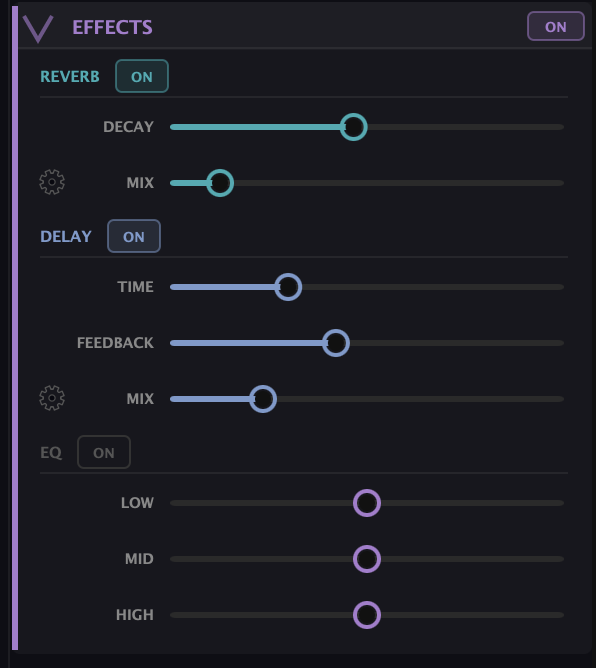
- EQ — a simple three-band tone shaper: a low shelf around 200 Hz, a mid peak around 1 kHz, and a high shelf around 4 kHz. Trim the lows to clean up a bass-heavy patch, dip the mids to make room, or lift the highs for air. It’s broad-strokes EQ, meant for shaping the patch in place rather than surgical mixing.
- Delay — an echo with Time, Feedback (how many repeats), and Mix (how loud the echoes sit against the dry sound). Short times thicken; long times create rhythmic echoes.
- Reverb — space. Decay sets the room size (short for a small room, long for a hall or wash) and Mix sets how wet it is. A little reverb glues a patch together; a lot turns it into a pad or a texture.
A note on using them
These are finishing effects, not the main event — the character of a BKS Harmonic patch comes from the partials, not the reverb. Used lightly, the chain saves you a trip to your DAW’s effects and keeps a preset sounding complete on its own. If you’re mixing seriously, you may still prefer to bypass these and use your own — but for sketching, performing, and sharing patches, having them built in means a sound is done when it leaves the synth.
What to Practice
- Add a touch of Reverb (short decay, low mix) to a dry patch to set it in a space.
- Set a Delay with moderate feedback and a rhythmic time, then play single notes and let them echo.
- Use the EQ to trim lows on a heavy patch or lift highs on a dull one — small moves go a long way.
Search This Guide
This Course
- 1. What the Harmonic Synth Is
- 2. The Partials Matrix
- 3. Fold, Gin, and Tonic
- 4. Seeing Sound — the Scope
- 5. Partials Advanced
- 6. Sculpt — Shaping the Spectrum
- 7. The Overtone Scan
- 8. The Harmonic Envelope
- 9. The Harmonic Gate
- 10. Tuning — Stretch, Temperament, and Unison
- 11. Source 2 — the Second Layer
- 12. The Filter
- 13. The Envelope
- 14. Modulation — Making It Move
- 15. Output
- 16. Effects
- 17. Presets, Settings, and the Top Bar
- 18. Audio In and Resynthesis
When you're ready to take the next step, it starts with a place where you can ask questions. We teach live — small group, cameras optional, taught by someone who gives a shit.
Find Out How You Can Join Us →© 2026 Beat Kitchen School — beatkitchen.io. All rights reserved. Unauthorized reproduction or distribution of this material is prohibited.